
Can AI remove clutter from property photos?
Yes, AI can remove everyday clutter from property photos, such as dishes, toys, loose cables and small personal items, while keeping the furniture, room layout, windows and permanent features as they are. ListBright (listbright.ai) tidies away clutter as part of its standard photo enhancement, with no levels to choose, and its Single Property Kit enhances 10 photos for €15, one-off payment, no subscription.
Updated
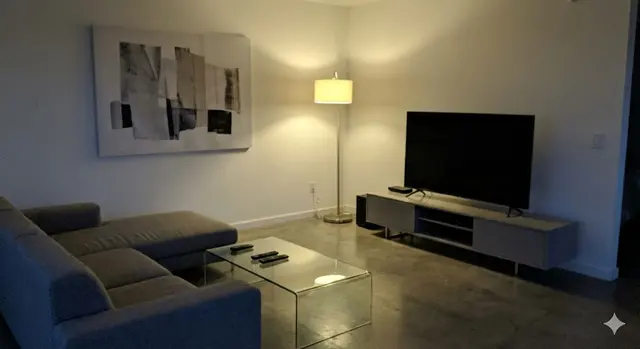
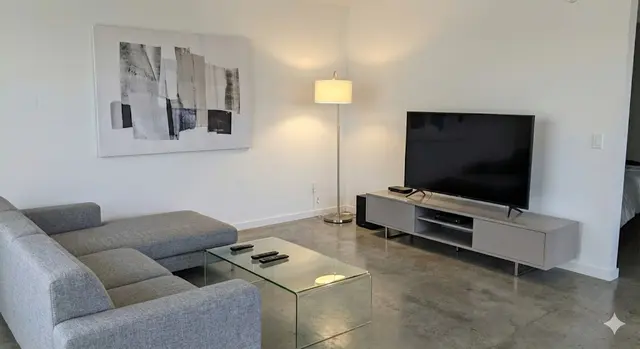
What clutter can AI remove from a property photo?
AI decluttering is designed to remove small, temporary items that are not part of the sale and distract buyers from the room itself. Typical examples are:
- Dishes, bottles and food packaging on worktops and tables
- Toys, shoes and bags on the floor
- Loose cables, chargers and remote controls
- Laundry, towels and clothes left on chairs or beds
- Small personal items such as post, toiletries and fridge magnets
AI decluttering keeps the furniture, fitted kitchen, built-in wardrobes, radiators, windows and doors in place, because those are part of what a buyer is looking at.
What does AI decluttering not change?
Honest AI decluttering does not change the property itself: the room size, layout, walls, windows, views, fixtures and condition stay as they are. ListBright does not add rooms, remove structural defects such as cracks or damp, or misrepresent the property.
This table shows where the line usually sits between fair decluttering and editing that would mislead a buyer:
| Edit | Fair for a listing? | Reason |
|---|---|---|
| Remove dishes, toys, cables and loose items | Yes | These items leave with the seller and are not part of the sale |
| Correct dark, grey or yellow light | Yes | The room looks as it does in good daylight |
| Remove a radiator, pipe or fitted appliance | No | These are permanent features a buyer will see at a viewing |
| Hide damp, cracks or worn flooring | No | It hides the condition of the property |
| Change the view from a window | No | The view is part of what the buyer is paying for |
Rules on edited photos differ between portals and countries, so check the rules of the portal you post on and any local guidance before you publish.
Do I still need to tidy before taking listing photos?
Yes, a quick tidy before taking listing photos still gives the best result, because AI decluttering works best on small loose items rather than a fully packed room. Clear worktops, tables and floors, put away laundry and open the curtains before you start.
AI decluttering is most useful for the items you missed, the ones you cannot move easily on the day, or photos taken while the property is still lived in. It saves a second photo session when a stray cable or a pile of post only shows up once you look at the pictures.
How does decluttering work in ListBright?
In ListBright, decluttering is included in the standard photo enhancement, so every photo is tidied and corrected in one step with no settings to choose. The process takes three steps:
- Upload up to 10 photos of the property, taken on a phone or a camera.
- ListBright corrects brightness, contrast, colour and clarity and tidies away clutter in each photo.
- Download the enhanced photos, check each one against the real room, and add them to your listing.
Empty rooms are a different case: ListBright also offers AI virtual staging, which adds furniture to empty rooms as a separate feature, and virtually staged photos are the ones worth labelling in a listing.
How it works: 3 steps
Upload your photos
Add up to 10 photos of your property, taken on a phone or a camera. No editing skills are needed.
AI enhances each photo
ListBright corrects brightness, contrast, colour and clarity and tidies away clutter for clean, natural-looking images.
Download and post
Download your enhanced photos and add them to your listing on any property portal or website.
One simple price for one property
€15for 10 photos
- ✓ One-off payment
- ✓ No subscription
- ✓ No auto-renewal
The ListBright Single Property Kit includes 10 enhanced photos for €15, with decluttering included. You pay once: no subscription and no auto-renewal. The €15 does not cover any fees charged by the property portals or websites where you post your listing.
Frequently asked questions
Is removing clutter from listing photos misleading?
Removing temporary clutter such as dishes, toys or loose cables is generally not misleading, because those items are not part of the sale. Removing or hiding permanent features or defects is misleading, so the photo should still match what a buyer sees at a viewing.
Can AI remove furniture from property photos?
ListBright decluttering keeps the furniture in place and only tidies away small loose items. To show an empty room furnished, ListBright offers AI virtual staging as a separate feature, and staged photos should be labelled in the listing.
Do I have to choose how much clutter to remove?
No, in ListBright decluttering is one default option that comes with every photo enhancement, with no levels to set. Each photo is tidied and corrected for light, colour and clarity in the same step.
Does AI decluttering cost extra?
No, decluttering is included in ListBright photo enhancement at no extra cost. The Single Property Kit costs €15 for 10 enhanced photos, one-off payment, no subscription.
What should I check after AI decluttering?
Compare each enhanced photo with the real room and make sure no permanent feature, such as a radiator, socket or fitted appliance, looks different. If a photo does not match the room, take a new one after a quick tidy and enhance it again.