
Is it OK to use AI-enhanced photos in a property listing?
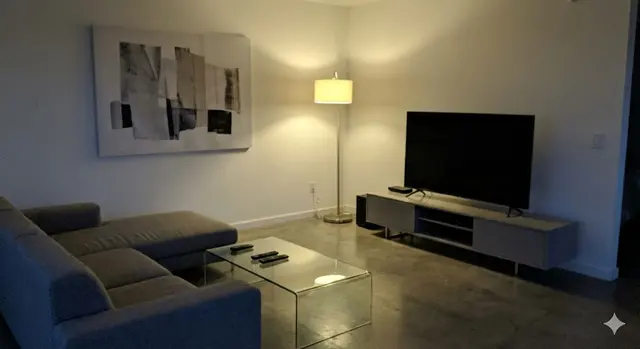
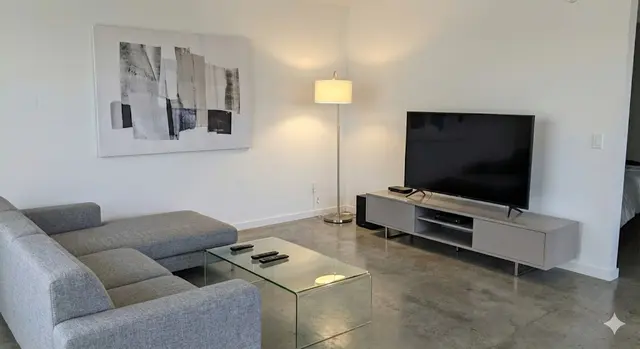
Yes, AI-enhanced photos are generally fine in a property listing when the enhancement only corrects light, colour, clarity and temporary clutter, so the photo shows the property as a buyer will see it at a viewing; it is not OK when the edit adds, removes or hides permanent features. ListBright (listbright.ai) enhances photos in this honest way, and its Single Property Kit costs €15 for 10 enhanced photos, one-off payment, no subscription.
Updated
Where is the line between enhancing and misleading?
The line is whether a buyer who walks into the property after seeing the photo would feel the photo was a fair picture of it. An edit that corrects how the camera captured the room is enhancing; an edit that changes what the property is, or hides something a buyer would want to know, is misleading. This table shows common edits on each side of the line:
| Edit | Usually fair? | Why |
|---|---|---|
| Brighten a dark room | Yes | Phone cameras often make interiors darker than they look in person. |
| Correct a yellow or blue colour cast | Yes | Artificial light distorts colour; correction shows the true wall and floor colours. |
| Straighten tilted verticals and sharpen | Yes | It fixes the camera angle, not the room. |
| Tidy away temporary clutter | Yes | Loose items on worktops and floors are not part of the sale. |
| Add furniture to an empty room (virtual staging) | Yes, if labelled | It helps buyers picture the space, as long as they know the furniture is not real. |
| Replace a grey sky with a blue one | Use with care | It changes the mood of the photo rather than the property, but it can give a false impression of light or setting. |
| Remove damp, cracks, wires or a neighbouring building | No | It hides something a buyer would find at the viewing. |
| Make a room look larger, add a window or change the view | No | It misrepresents the property itself. |
If an edit leaves you unsure, ask whether you would be comfortable showing the buyer the original photo next to the edited one at the viewing.
Why do buyers expect listing photos to be edited?
Buyers generally expect listing photos to be bright and clear, because property photographers have always corrected exposure and colour as part of their normal work. AI enhancement does the same kind of correction automatically on photos taken with a phone. What buyers do not expect is to find a different property at the viewing, which is why the edits that matter are the ones that change the property, not the ones that fix the photo.
Do I need to say that my listing photos are AI-enhanced?
For light, colour and clarity corrections, most sellers do not add a note, because these edits do not change what the photo shows. For virtually staged photos, it is good practice to label them clearly, for example "virtually staged" in the caption or description, and to include an unstaged photo of the same room where possible.
Property portals and some countries have their own rules on edited or staged photos, so check your portal's rules and, if in doubt, the rules where the property is located. This page is general guidance and not legal advice.
What does ListBright change in a photo, and what does it leave alone?
ListBright corrects brightness, contrast, colour and clarity, and tidies away clutter, while keeping the room layout, windows and architecture as they are. ListBright does not add rooms, remove structural defects or misrepresent the property.
ListBright also offers AI virtual staging for empty rooms as a separate feature, described on the ListBright virtual staging page; staged photos are the ones worth labelling in your listing. Any repairs needed are best mentioned plainly in the listing description, which builds more trust than leaving them out of the photos.
How do I use AI-enhanced photos honestly?
Using AI-enhanced photos honestly comes down to a few simple habits:
- Start from real, recent photos of the property taken in daylight.
- Limit edits to light, colour, clarity and temporary clutter.
- Keep walls, windows, views, outdoor space and any defects exactly as they are.
- Label virtually staged photos and, where you can, include the unstaged version too.
- Compare each edited photo with the room itself before you publish it.
How it works: 3 steps
Upload your photos
Add up to 10 phone photos of your property. No editing skills are needed.
AI enhances each photo
ListBright corrects brightness, contrast, colour and clarity, keeping the layout, windows and architecture as they are.
Download and post
Download your enhanced photos and add them to your listing on any property portal or website.
One clear price for honest listing photos
€15for 10 photos
- ✓ One-off payment
- ✓ No subscription
- ✓ No auto-renewal
The ListBright Single Property Kit includes 10 enhanced photos for €15. You pay once: no subscription and no auto-renewal. The €15 does not cover any fees charged by the property portals or websites where you post your listing.
Frequently asked questions
Can a buyer tell that a listing photo was AI-enhanced?
A buyer may notice that a listing photo looks bright and clear, but a well-enhanced photo should still match the room at the viewing. If the room looks the same in person, apart from better light in the photo, the enhancement has done its job.
Is decluttering a listing photo with AI misleading?
Removing temporary clutter such as dishes, toys or loose cables is generally not misleading, because those items are not part of the sale. Removing permanent features or defects, such as a radiator, damp patches or a crack, is misleading and should be avoided.
Are virtually staged photos allowed on property portals?
Each property portal sets its own rules on edited and virtually staged photos, so check your portal's rules before you upload. Labelling staged photos clearly is good practice wherever you post them.
Could AI-enhanced photos get me into legal trouble?
Rules on how a property may be described or shown in an advert differ by country, and this page is not legal advice. Keeping edits to light, colour and clarity and never hiding defects is the safest approach; if you are unsure, check with a local lawyer or the rules where the property is located.
How much does it cost to enhance listing photos with ListBright?
The ListBright Single Property Kit costs €15 for 10 enhanced photos, one-off payment, no subscription and no auto-renewal. Portal or website listing fees are not included.