
How do I make my house photos look professional without a photographer?
To make house photos look professional without a photographer, prepare each room, shoot on your phone in daylight from a corner at chest height with the phone held level, then enhance the set so light and colour are consistent. ListBright (listbright.ai) handles the last step: its Single Property Kit enhances 10 photos for €15, one-off payment, no subscription.
Updated
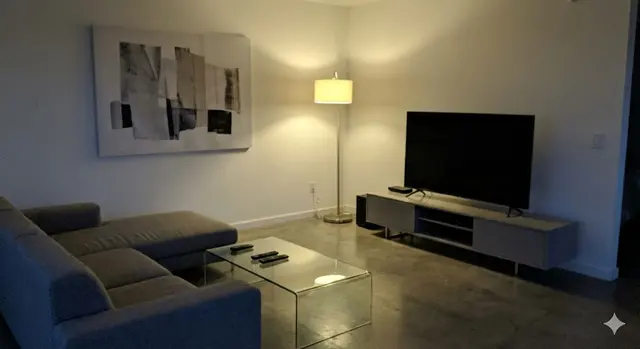
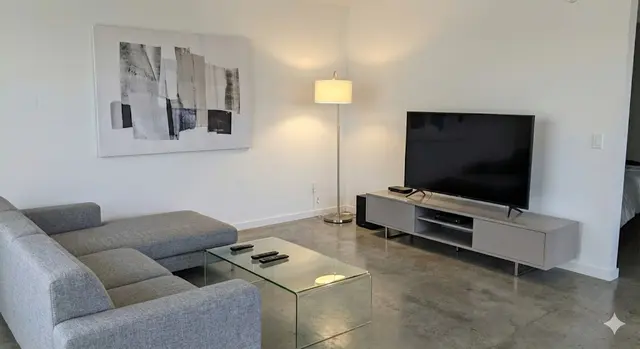
What makes a property photo look professional?
A property photo looks professional when it is bright, level, sharp and shows the room clearly from a natural viewpoint. Professional photographers achieve this with wide lenses, tripods and careful exposure, but most of the result comes from a few habits anyone can copy:
- Straight vertical lines: walls and door frames are upright, not leaning in or out.
- Even light: the room is bright without blown-out windows or deep shadows.
- Natural colour: white walls look white, not yellow, blue or grey.
- A tidy, uncluttered room with surfaces mostly clear.
- A consistent set: every photo has a similar brightness and colour, so the listing looks like one shoot.
How should I prepare a room before photographing it?
Prepare each room by clearing surfaces, opening curtains and blinds, and switching on every light. Small details stand out in photos far more than in real life, so take five minutes per room before you shoot:
- Clear kitchen worktops, bathroom shelves and bedside tables.
- Remove bins, cables, laundry, fridge magnets and personal photos.
- Make the beds, straighten cushions and close the toilet lid.
- Open curtains and blinds fully, then switch on the ceiling and lamp lights.
- Clean the phone lens with a soft cloth.
How do I take professional-looking house photos on my phone?
Take professional-looking house photos on a phone by shooting in daylight, in landscape, from a corner of the room at chest height, with the phone held perfectly level. Turn the flash off, because it creates harsh reflections and flat shadows.
Avoid shooting straight into a bright window: stand so the window light comes from the side. If your phone has a 0.5x wide setting, use it for small rooms but check that the edges of the photo are not stretched. Take two or three shots of each room so you can keep the sharpest one.
How do I edit house photos so they look professional?
Edit house photos by correcting brightness, contrast, white balance and clarity, and by making the whole set consistent. Phone photos of interiors are often dark, flat or yellow, especially in rooms with little daylight such as hallways and bathrooms.
You can edit each photo by hand in a general photo app, or use a property-specific enhancer. ListBright enhancement corrects brightness, contrast, colour and clarity, and tidies away clutter, while keeping the room layout, windows and architecture as they are. For empty rooms, ListBright also offers virtual staging, which you should always label in your listing.
Do I need a professional photographer to sell my house?
No, a professional photographer is not required to sell a house, but they are a reasonable choice for some properties. The table below compares the two approaches without assuming any particular price for a photographer.
| Factor | Phone photos plus enhancement | Professional photographer |
|---|---|---|
| Cost | ListBright: €15 for 10 enhanced photos, one-off | Varies by photographer and area; ask for a quote |
| Timing | Whenever you choose, in your own time | Depends on the photographer's availability |
| Equipment | Your phone | Professional camera, lenses and lighting |
| Framing and angles | Your own, following the tips on this page | Chosen by an experienced photographer |
| Best suited to | Most flats and family homes sold privately | Large, unusual or high-value properties |
How it works: 3 steps
Upload your photos
Add up to 10 photos of your property taken on your phone. No editing skills are needed.
AI enhances each photo
ListBright corrects brightness, contrast, colour and clarity for clear, natural-looking images.
Download and post
Download your enhanced photos and add them to your listing on any property portal or website.
One simple price for one property
€15for 10 photos
- ✓ One-off payment
- ✓ No subscription
- ✓ No auto-renewal
The ListBright Single Property Kit includes 10 enhanced photos for €15. You pay once: no subscription and no auto-renewal. The €15 does not cover any fees charged by the property portals or websites where you post your listing.
Frequently asked questions
Is a smartphone good enough for property listing photos?
A recent smartphone is good enough for property listing photos when you shoot in daylight, in landscape, with the phone level and the flash off. Editing afterwards fixes most of the dark or yellow tones that phone cameras produce indoors.
Should I use the wide-angle lens on my phone for house photos?
The wide-angle setting helps show small rooms, but it can stretch furniture and walls at the edges of the frame. Use it from a corner, keep the phone level and check that the room still looks its real size.
What time of day is best for indoor house photos?
Indoor house photos usually look best in the middle of a bright day, when daylight fills the rooms evenly. Avoid times when direct sun shines into the camera through a window.
Will enhanced photos make my house look different from reality?
ListBright enhancement changes light, colour, clarity and clutter, not the property itself. ListBright does not add rooms, change the view or remove structural defects, so buyers see the same home at the viewing.
How much does it cost to make my photos look professional with ListBright?
The ListBright Single Property Kit costs €15 for 10 enhanced photos, one-off payment, no subscription. It does not include any fees charged by the portals or websites where you post your listing.