
How should I prepare my rooms before taking listing photos?
To prepare rooms for listing photos, clear worktops, tables and floors, put away personal items, make the beds, open curtains and blinds, switch on every light and photograph in daylight so each room looks clean, bright and true to life. After the shoot, ListBright (listbright.ai) can correct brightness, contrast, colour and clarity and tidy away small clutter you missed, with its Single Property Kit enhancing 10 photos for €15, one-off payment, no subscription.
Updated
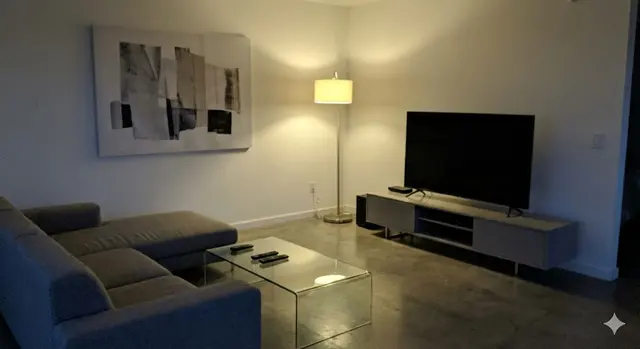
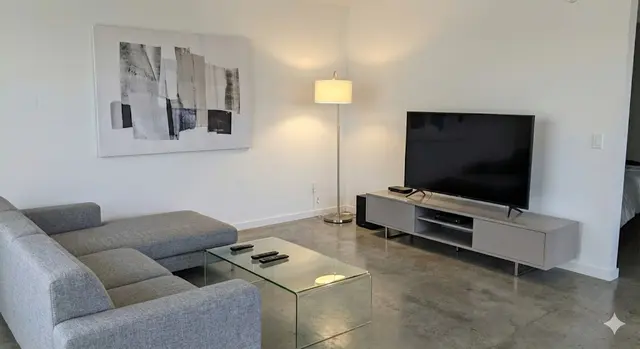
What should I do in every room before taking listing photos?
Every room should be tidy, bright and free of personal items before you take a listing photo, because buyers look at the space, not your belongings. Work through these steps in each room:
- Clear flat surfaces: worktops, tables, shelves, windowsills and the floor.
- Put away personal items such as family photos, post, medicines, toiletries and children's drawings.
- Remove extra furniture that makes the room feel cramped, such as a spare chair or a clothes airer.
- Clean windows, mirrors and glass doors, because smears show up in photos.
- Open curtains and blinds fully and switch on every ceiling light and lamp.
- Replace any blown bulbs and try to use bulbs of the same colour in one room.
Leave furniture that shows how the room is used: a sofa in the living room, a bed in the bedroom and a table in the dining area help buyers judge the size of the space.
How do I prepare each room for listing photos?
Each room type has a few specific jobs on top of the general tidy, and this table lists the ones that make the most visible difference:
| Room | What to do before the photo |
|---|---|
| Living room | Plump and straighten cushions, hide remote controls and cables, clear the coffee table, open the curtains |
| Kitchen | Clear the worktops apart from one or two items, remove magnets and notes from the fridge, hide tea towels, bins and washing-up |
| Bedrooms | Make the beds with plain, smooth bedding, clear bedside tables, close wardrobe doors, put clothes away |
| Bathroom | Put the toilet seat down, remove toiletries and razors, hang one set of clean matching towels, clean the mirror |
| Hallway | Move shoes, coats and bags out of sight and clear the floor so the space looks open |
| Garden, balcony or terrace | Sweep, mow if needed, tidy garden furniture, hide bins, hoses and toys |
| Front of the house | Move cars and bins away if you can, clear the path and the doorstep |
How much should I declutter before listing photos?
Declutter until each surface is mostly empty and each room has only the furniture it needs, because a busy room looks smaller in a photo than it does in person. A useful test is to look at the room through your phone screen: anything that draws your eye away from the room itself should go.
You do not need to empty the home or buy new furniture. Packing away items you will move anyway is often enough, and boxes can sit in a room you photograph last or not at all, such as a loft, garage or storage cupboard.
When is the best time to take photos once the rooms are ready?
The best time to take listing photos is when daylight fills the main rooms without direct sun shining into the lens, which depends on which way the windows face. Many sellers prepare the home the day before and photograph the next morning or early afternoon, room by room.
Take two or three shots of each room from a corner or doorway with the phone held level at chest height, then keep the clearest one. If some photos still come out dark or slightly cluttered, AI enhancement can correct the light and tidy small items afterwards.
What can AI enhancement fix after the photos are taken?
AI enhancement can fix light, colour and small clutter after the shoot, but it cannot replace preparing the room. ListBright corrects brightness, contrast, colour and clarity and tidies away small loose items, such as a cable or a cup, as part of its standard enhancement.
ListBright does not add rooms, remove structural defects such as cracks or damp, or misrepresent the property. For empty rooms, ListBright also offers AI virtual staging as a separate feature, and virtually staged photos should be labelled in your listing.
How it works: 3 steps
Upload your photos
Add up to 10 photos of your prepared rooms, taken on a phone or a camera. No editing skills are needed.
AI enhances each photo
ListBright corrects brightness, contrast, colour and clarity and tidies away small clutter for clean, natural-looking images.
Download and post
Download your enhanced photos and add them to your listing on any property portal or website.
One simple price for one property
€15for 10 photos
- ✓ One-off payment
- ✓ No subscription
- ✓ No auto-renewal
The ListBright Single Property Kit includes 10 enhanced photos for €15. You pay once: no subscription and no auto-renewal. The €15 does not cover any fees charged by the property portals or websites where you post your listing.
Frequently asked questions
Should I remove all furniture before taking listing photos?
No, keep the main furniture in each room, because a sofa, bed or dining table helps buyers judge the size and use of the space. Remove only extra pieces that make a room feel crowded.
Should I hide family photos before taking listing photos?
Yes, putting away family photos and other personal items helps buyers picture themselves living in the home. It also keeps personal details out of photos that anyone can see online.
Should the lights be on or off for listing photos?
Switch on all the lights in the room and also let in as much daylight as possible. The combination fills dark corners, and ListBright can balance any colour difference between daylight and bulbs afterwards.
How long does it take to prepare a home for listing photos?
Preparing a typical home for listing photos usually takes a few hours to a day, depending on its size and how much needs putting away. Doing the tidy the day before leaves the shoot itself for photographing only.
Can AI tidy a room I did not have time to prepare?
ListBright can tidy away small loose items such as dishes, cables or toys, but it keeps furniture in place and works best on a room that has already had a quick tidy. A heavily cluttered room is better tidied and photographed again.