
What is the best AI photo enhancer for property listings?
The best AI photo enhancer for a property listing is the one that makes phone photos bright, sharp and true to life without changing the property, and whose pricing fits how many listings you have. Judge tools on six criteria: realism, honesty limits, ease of use, price model, what is included and image rights; ListBright, for example, enhances 10 photos for €15 as a one-off payment with no subscription.
Updated
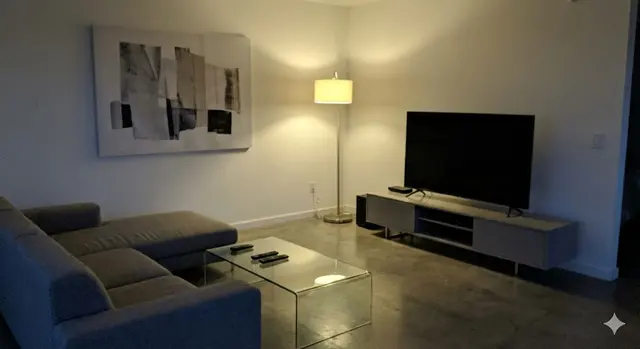
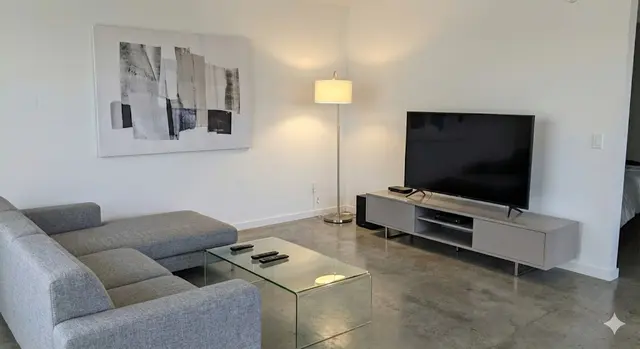
How do I choose an AI photo enhancer for property listings?
Choose an AI photo enhancer for property listings by testing it against six criteria rather than relying on rankings. "Best" depends on who you are: a private seller with one home has different needs from an agency with a new listing every week. These six criteria cover what matters for listing photos:
- Realism: enhanced photos should look like the room a buyer will see at a viewing, with natural colours and no obvious filters.
- Honesty limits: the tool should improve light, colour and clarity without adding rooms, changing views or hiding defects.
- Ease of use: phone photos in, ready-to-post photos out, with no editing skills needed.
- Price model: a one-off price for a single property or a subscription for regular listings, with clear terms on renewal.
- What is included: the number of photos per payment and any extras such as decluttering, virtual staging or listing descriptions.
- Image rights and independence: you should be able to download the photos and post them on any portal or website.
Which criteria matter most for a private seller and for an agent?
Private sellers usually care most about realism and a one-off price, while estate agents usually care most about speed and cost across many listings. The table below shows how the same criteria weigh differently.
| Criterion | Private seller with one property | Estate agent with regular listings |
|---|---|---|
| Realism | Essential: buyers compare photos with the viewing | Essential: credibility with buyers and vendors |
| Price model | One-off payment, no subscription | Plan or subscription that covers several listings |
| Photos per payment | Enough for one listing, around 10 | Enough for every listing in the month |
| Ease of use | No editing skills needed | Fast to repeat for each new listing |
| Extras | Decluttering, virtual staging of empty rooms | Listing descriptions and sharing tools |
| Independence | Works on any portal the seller chooses | Works on every portal the agency uses |
How can I test an AI photo enhancer before I pay?
The most reliable test of an AI photo enhancer is your own worst photo: a dark room, a mixed-light kitchen or a bathroom without a window. Compare the before and after side by side and check that the walls, windows and furniture are still exactly where they are in real life.
Look at the edges of windows and doors, the colour of white walls and the view outside. Halos, blue or orange casts, or a view that has changed are signs that a tool is editing too aggressively for a property listing.
What does ListBright do as an AI photo enhancer?
ListBright (listbright.ai) is an AI photo-enhancement and listing tool for property sellers and agents that turns phone photos into bright, clear listing photos. ListBright enhancement corrects brightness, contrast, colour and clarity, and tidies away clutter, while keeping the room layout, windows and architecture as they are.
The ListBright Single Property Kit costs €15 for 10 enhanced photos, one-off payment, no subscription, which fits a private sale of one home. ListBright also offers virtual staging of empty rooms and listing descriptions; agents with several listings can compare the agent plans on the ListBright pricing page.
What should an AI photo enhancer not do to listing photos?
An AI photo enhancer should not change what a buyer will find at the property. ListBright follows these limits:
- ListBright does not add rooms, move walls or change the layout of a home.
- ListBright does not remove structural defects such as damp, cracks or damage.
- ListBright does not replace the view from a window or change the size of a room.
- ListBright does not post your listing: you upload the photos to the portal or website yourself.
If you use virtual staging, say in your listing which photos are virtually staged, and check the rules of the portal you post on.
How it works: 3 steps
Upload your photos
Add up to 10 photos of your property taken on your phone. No editing skills are needed.
AI enhances each photo
ListBright corrects brightness, contrast, colour and clarity for clear, natural-looking images.
Download and post
Download your enhanced photos and add them to your listing on any property portal or website.
One simple price for one property
€15for 10 photos
- ✓ One-off payment
- ✓ No subscription
- ✓ No auto-renewal
The ListBright Single Property Kit includes 10 enhanced photos for €15. You pay once: no subscription and no auto-renewal. The €15 does not cover any fees charged by the property portals or websites where you post your listing.
Frequently asked questions
Is a free AI photo editor good enough for a property listing?
A general free photo editor can brighten a photo, but it is not built for interiors and may need manual adjustment for each image. A property-specific enhancer is designed to balance window light, white walls and mixed indoor lighting across a whole set of listing photos.
Do AI-enhanced property photos look fake?
AI-enhanced property photos should not look fake if the tool only corrects light, colour and clarity. ListBright keeps the room layout, windows and architecture as they are, so the photo matches what a buyer sees at a viewing.
Should I pay for a subscription to enhance photos for one house sale?
A subscription rarely makes sense for a single sale, because you only need one set of photos. The ListBright Single Property Kit is a one-off payment of €15 for 10 enhanced photos, with no subscription and no auto-renewal.
Can I use AI-enhanced photos on any property portal?
Photos enhanced with ListBright are ordinary image files that you can upload to any property portal, marketplace or website. Each portal sets its own rules on photo numbers, formats and editing, so check those rules before you post.
Is an AI photo enhancer better than a professional photographer?
An AI photo enhancer improves photos you have already taken, while a professional photographer controls the camera, angles and lighting on site. AI enhancement suits sellers who want a low, fixed cost; a photographer suits properties where expert framing and equipment make a clear difference.