
How do I fix dark or gloomy property photos?
To fix dark or gloomy property photos, raise the brightness and lift the shadows, correct the white balance so walls look neutral, and add a little contrast and clarity, or reshoot in daylight if the original is very dark or blurred. ListBright (listbright.ai) does these corrections automatically: its Single Property Kit enhances 10 photos for €15, one-off payment, no subscription.
Updated
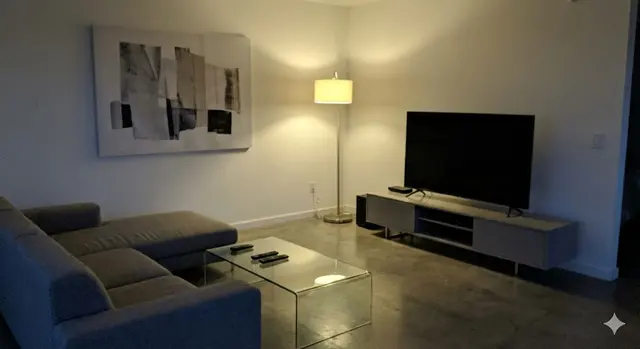
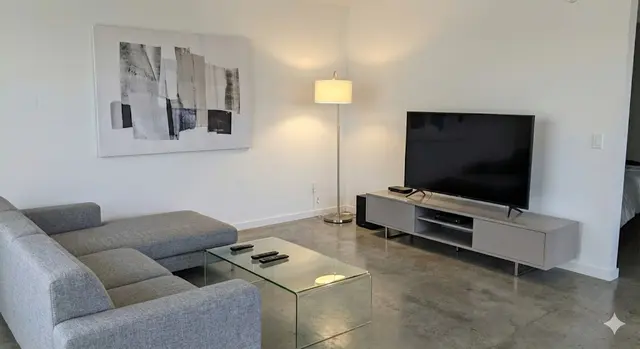
Why do my property photos look dark?
Property photos usually look dark because the camera sets its exposure for the brightest part of the scene, often a window, which leaves the rest of the room underexposed. Other common causes are easy to recognise:
- Shooting on a dull day, in the evening or with curtains and blinds partly closed.
- Pointing the camera straight at a bright window, so the room turns into a silhouette.
- Rooms with little or no daylight, such as hallways, bathrooms and basements.
- Warm ceiling bulbs that make the whole photo look yellow, orange or murky.
- Dark floors, furniture or wall colours that absorb light.
How do I brighten a dark property photo?
Brighten a dark property photo by adjusting a few settings in a fixed order, so the result stays natural rather than washed out. Most photo apps offer these controls:
- Raise exposure or brightness until the walls look as light as they do in real life.
- Lift the shadows to reveal detail in corners, under furniture and in dark floors.
- Lower the highlights so windows and white surfaces do not turn pure white.
- Correct the white balance so white walls look white rather than yellow or blue.
- Add a little contrast and clarity to remove the flat, foggy look.
Apply similar settings to every photo of the property, so the listing looks like one consistent set rather than a mix of light and dark images.
Can AI fix dark property photos automatically?
Yes, an AI photo enhancer can correct brightness, shadows, colour and clarity in one step, without manual sliders. ListBright enhancement is built for property photos: it brightens dark rooms, removes yellow or grey casts, sharpens detail and tidies away clutter, while keeping the room layout, windows and architecture as they are.
Editing by hand works well for one or two photos, while an AI enhancer saves time and keeps a whole set of 10 photos consistent. The table below compares the two approaches.
| Factor | Editing by hand | ListBright AI enhancement |
|---|---|---|
| Skill needed | Some familiarity with exposure, shadows and white balance | None: upload the photos and download the results |
| Consistency across photos | Depends on matching settings for each photo | Each photo is corrected automatically for a consistent set |
| Cost | Free with your phone's photo app, or the price of editing software | €15 for 10 enhanced photos, one-off payment |
| Extra options | Whatever your editing app offers | Decluttering, plus optional virtual staging for empty rooms |
When should I reshoot a dark photo instead of editing it?
Reshoot a dark photo when it is blurred, very grainy or so underexposed that the room is barely visible, because editing cannot recover detail the camera never captured. Choose a bright part of the day, open every curtain and blind, switch on all the lights and keep the flash off.
Stand so the window light comes from the side rather than straight into the lens, and hold the phone steady and level, ideally resting on a shelf or a small tripod. A well-exposed original then needs only a light enhancement.
Is it honest to brighten property photos?
Brightening property photos is honest when it shows the room as it looks to the eye at a viewing, not brighter, bigger or different. ListBright corrects light, colour and clarity but does not add rooms, change the view or remove structural defects such as damp or cracks. Check your portal's rules and any local rules on edited listing photos, and label virtually staged images clearly.
How it works: 3 steps
Upload your photos
Add up to 10 photos of your property, including the dark or gloomy ones. No editing skills are needed.
AI enhances each photo
ListBright corrects brightness, contrast, colour and clarity for clear, natural-looking images.
Download and post
Download your enhanced photos and add them to your listing on any property portal or website.
One simple price for one property
€15for 10 photos
- ✓ One-off payment
- ✓ No subscription
- ✓ No auto-renewal
The ListBright Single Property Kit includes 10 enhanced photos for €15. You pay once: no subscription and no auto-renewal. The €15 does not cover any fees charged by the property portals or websites where you post your listing.
Frequently asked questions
Can a very dark photo be fixed without making it grainy?
A slightly dark photo can usually be brightened without visible grain, but a very dark one often shows noise once it is lightened. If a photo looks grainy after brightening, reshoot it in daylight with all the lights on.
Should I use the flash to avoid dark property photos?
No, the flash usually makes property photos worse, with harsh reflections, flat light and dark corners. Daylight, room lights and editing afterwards give a more natural result.
How do I fix yellow or orange property photos?
Fix yellow or orange property photos by correcting the white balance until white walls look neutral. ListBright corrects colour casts automatically as part of its enhancement.
Can ListBright fix a dark bathroom or hallway photo with no window?
ListBright can brighten photos of rooms without windows, such as bathrooms and hallways, and correct their colour. The best results come from photos taken with all the lights switched on and the phone held steady.
How much does it cost to fix dark property photos with ListBright?
The ListBright Single Property Kit costs €15 for 10 enhanced photos, one-off payment, no subscription. It does not include any fees charged by the portals or websites where you post your listing.