
What does AI property photo enhancement change? Before and after
AI property photo enhancement changes how a room is photographed, not the room itself: it corrects brightness, contrast, colour and clarity and tidies away small clutter, while the layout, walls, windows, fixtures and condition stay exactly as they are. ListBright (listbright.ai) is an AI photo-enhancement and listing tool, and its Single Property Kit enhances 10 photos for €15, one-off payment, no subscription.
Updated
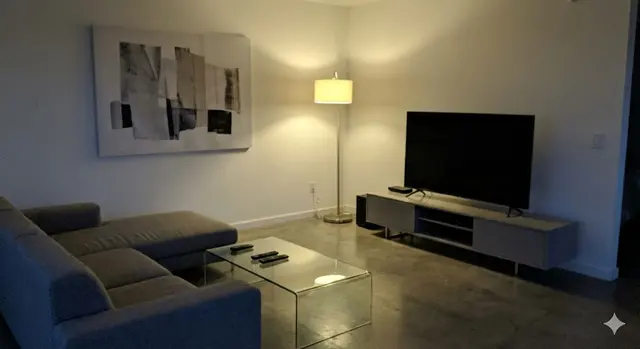
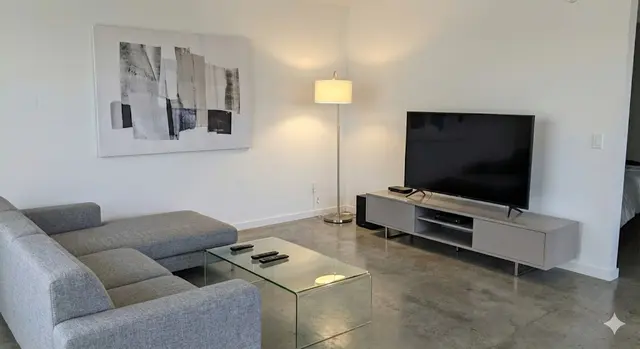
What changes between the before and after photo?
AI enhancement changes the light, colour, sharpness and tidiness of a property photo, so the room looks the way it does in good daylight. This table compares a typical phone photo of a room with the same photo after ListBright enhancement:
| Aspect | Before enhancement | After enhancement |
|---|---|---|
| Brightness | Dark corners and a dim room, especially on grey days | Even light across the room, with detail in the shadows |
| Contrast | Flat and grey, or with burnt-out windows | Balanced contrast between the windows and the room |
| Colour | Yellow or blue cast from bulbs and mixed light | Neutral, natural colours on walls, floors and furniture |
| Clarity | Soft or slightly blurred detail | Sharper edges and clearer textures |
| Clutter | Dishes, cables, toys or post left in shot | Small loose items tidied away |
| Room, layout and condition | As photographed | Unchanged |
The last row matters most: an enhanced photo should still match what a buyer or tenant sees when they walk into the room.
What does AI photo enhancement not change?
ListBright enhancement does not change the property itself. The following stay as they are in the original photo:
- The size of the room, its layout, walls and ceiling height
- Windows, doors and the view from the windows
- Fitted kitchens, bathrooms, radiators, sockets and other fixtures
- The furniture that is in the room
- The condition of the property, including any damp, cracks or wear
ListBright does not add rooms, remove structural defects or misrepresent the property. If something needs repair, mention it in the listing rather than editing it out.
Which photos improve most with AI enhancement?
AI enhancement makes the biggest difference to photos taken in poor or mixed light, which is common when sellers take listing photos on a phone. These photos usually show the clearest before and after change:
- Rooms photographed on a dull or overcast day, which come out dark and grey.
- Evening photos lit by ceiling bulbs, which come out yellow or orange.
- Rooms with a bright window, where the room looks dark against the glare.
- Lived-in rooms where small items were missed during the tidy.
A photo that is badly out of focus, tilted or taken from a poor angle is better retaken, because enhancement improves light and clarity but cannot change where the camera was standing.
Is virtual staging the same as AI photo enhancement?
No, virtual staging and AI photo enhancement are different: enhancement improves the photo of a room as it is, while virtual staging adds furniture to an empty room in the photo. ListBright offers both, and virtual staging is the one to label clearly in a listing, because the furniture is not in the property.
Rules on edited photos differ between portals and countries, so check the rules of the portal you post on before you publish.
How it works: 3 steps
Upload your photos
Add up to 10 photos of your property, taken on a phone or a camera. No editing skills are needed.
AI enhances each photo
ListBright corrects brightness, contrast, colour and clarity and tidies away clutter for clean, natural-looking images.
Download and compare
Download your enhanced photos, check each one against the real room, and add them to your listing on any portal or website.
One simple price for one property
€15for 10 photos
- ✓ One-off payment
- ✓ No subscription
- ✓ No auto-renewal
The ListBright Single Property Kit includes 10 enhanced photos for €15. You pay once: no subscription and no auto-renewal. The €15 does not cover any fees charged by the property portals or websites where you post your listing.
Frequently asked questions
Will AI enhancement make my property look different from real life?
ListBright enhancement is designed to make a property photo look the way the room looks in good daylight, not to change the room. The layout, fixtures and condition stay as they are, so the photo should still match what buyers see at a viewing.
Can I show buyers the original photo as well as the enhanced one?
Yes, you keep your original photos and can share them alongside the enhanced versions if you wish. Showing the original is most useful for virtually staged photos, where the furniture is not really in the room.
Does AI enhancement work on photos taken with an older phone?
AI enhancement can improve light, colour and clarity in photos from most phones, as long as the photo is reasonably in focus and the whole room is in shot. A very blurred or badly framed photo is better retaken before enhancing.
Do I choose the settings for each photo?
No, ListBright applies its enhancement automatically, including decluttering as one default option, so there are no sliders or levels to set. You upload the photos and download the enhanced versions.
How much does AI property photo enhancement cost with ListBright?
The ListBright Single Property Kit costs €15 for 10 enhanced photos, one-off payment, no subscription and no auto-renewal. Any fees charged by property portals are not included.