
Why is my property listing not getting viewings?
A property listing usually gets few or no viewings because of one or more of five fixable factors: the asking price, the first photo and the photo set, the title and description, where the listing is posted, and how quickly the seller answers enquiries. Photos are the quickest of these to fix, and ListBright (listbright.ai) enhances phone photos with AI for €15 for 10 photos, one-off payment, no subscription.
Updated
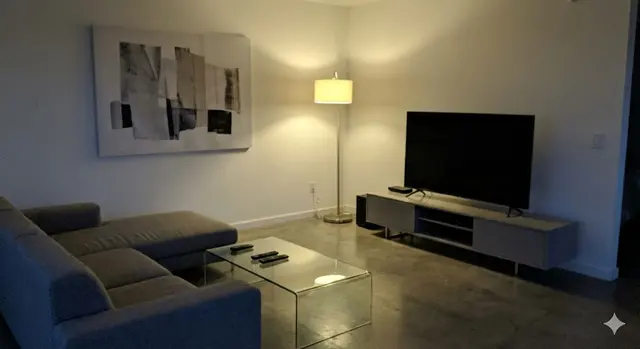
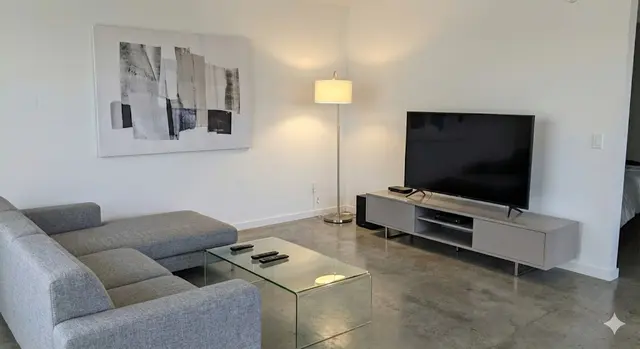
What are the most common reasons a property gets no viewings?
A property gets no viewings when buyers either do not see the listing or see it and decide not to open it or not to get in touch. The table lists the usual causes, how to spot each one and what a seller can do about it:
| Cause | Sign to look for | What you can do |
|---|---|---|
| Asking price above similar homes | People view the listing but few get in touch | Compare the price with similar homes for sale and recently sold nearby, and consider a valuation |
| Dark, dull or cluttered photos, or a weak first photo | The listing gets few clicks from the search results even though the price is in line | Retake the photos in daylight, tidy the rooms, enhance the photos and lead with the brightest room or the front of the home |
| Thin or unclear description | Buyers ask questions the listing should answer | Add size, rooms, outdoor space, condition and what is nearby |
| Listing not where local buyers search | Very few people see the listing at all | Post on the portals buyers in your area actually use |
| Slow replies to enquiries | Enquiries arrive but do not turn into viewings | Reply the same day and offer clear viewing times |
Most listings with no viewings have more than one of these causes, so it is worth checking all five before changing the price.
Can bad photos stop people booking viewings?
Yes, bad photos can stop people booking viewings, because buyers scrolling a property portal decide in seconds whether a listing is worth opening, mainly from the price and the first photo. Dark rooms, yellow light, tilted angles and cluttered surfaces make a home look smaller and less cared for than it is.
Photos are also the cause a seller can fix fastest: retake them in daylight with the lights on, tidy each room and enhance the photos so the light and colour match what a buyer sees in person. ListBright enhances phone photos with AI, correcting brightness, contrast, colour and clarity and tidying away clutter, without changing the property itself.
How do I know if my asking price is the problem?
The asking price is likely the problem if similar homes nearby are listed or have sold for less, or if the listing gets plenty of views but very few enquiries. To check, compare your home with properties of the same type, size and condition in the same area, and ask for a valuation if you are unsure.
Better photos and a clearer description help a fairly priced home stand out, but they cannot make up for a price that buyers see as too high.
What should I check in my listing before lowering the price?
Before lowering the price, check the parts of the listing you can improve at no or low cost, in this order:
- First photo: is it bright, level and of the most appealing room or the front of the home?
- Photo set: does it show every main room, the kitchen, the bathroom and any outdoor space, in daylight?
- Title and description: do they state the size, number of rooms, outdoor space and condition plainly?
- Portals: is the listing on the sites buyers in your area use, and does it follow each site's rules?
- Replies: are you answering enquiries the same day and offering clear viewing times?
- Price: after the steps above, how does it compare with similar homes nearby?
Change one or two things at a time, so you can see what made the difference.
Can better photos alone get my property more viewings?
Better photos alone can bring more viewings when photos were the main weak point, but they will not help if the price, the description or slow replies are holding the listing back. ListBright improves light, colour and clarity in the photos; it does not add rooms, remove structural defects or misrepresent the property, and it does not set the price, write the portal rules or answer enquiries for you.
How it works: 3 steps
Upload your photos
Add up to 10 photos of your property, taken on a phone. No editing skills are needed.
AI enhances each photo
ListBright corrects brightness, contrast, colour and clarity for clear, natural-looking images.
Download and update your listing
Download the enhanced photos and replace the old ones on the property portal or website where your home is listed.
One clear price to refresh your listing photos
€15for 10 photos
- ✓ One-off payment
- ✓ No subscription
- ✓ No auto-renewal
The ListBright Single Property Kit includes 10 enhanced photos for €15. You pay once: no subscription and no auto-renewal. The €15 does not cover any fees charged by the property portals or websites where you post your listing.
Frequently asked questions
How long should I wait for viewings before changing my listing?
There is no fixed rule, but if a listing gets clicks and enquiries in its first couple of weeks and then goes quiet, or gets almost none from the start, it is worth reviewing the photos, description and price. Change one or two things at a time so you can see what helped.
Should I change the first photo of my property listing?
Yes, if the listing gets few clicks, changing the first photo is one of the quickest things to try. Use the brightest, most appealing room or a clear photo of the front of the home, taken in daylight and held level.
Can I replace the photos on a listing that is already live?
Most property portals let sellers update the photos of a live listing, but check your portal's own rules and options. Replacing dark or cluttered photos with enhanced ones is a simple way to refresh a listing without starting again.
Does it matter which portals I post my property on?
Yes, a listing only gets viewings if buyers in your area see it, so post where local buyers search. Each portal has its own rules for private sellers, so check them before posting.
Will AI-enhanced photos disappoint buyers at the viewing?
Enhanced photos should not disappoint buyers when the enhancement only corrects light, colour and clarity, because the room looks the same in person. ListBright does not add rooms, remove structural defects or misrepresent the property, and any virtually staged photo should be labelled in the listing.