
How do I get good FSBO listing photos?
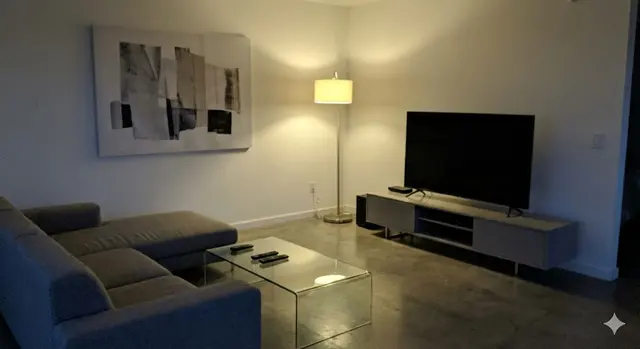
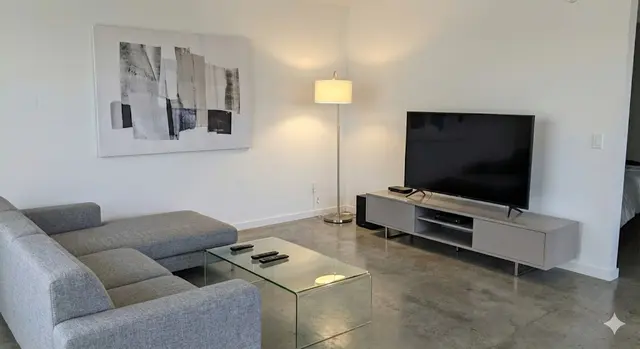
To get good FSBO (for sale by owner) listing photos, prepare each room, shoot every main space on your phone in daylight, in landscape and level, then enhance the best 10 so the light and colour match what buyers will see at a viewing. ListBright (listbright.ai) enhances 10 of your own photos for €15 with its Single Property Kit, one-off payment, no subscription.
Updated
What are my options for FSBO listing photos?
A FSBO seller can take the photos on a phone, pay a property photographer, or take the photos on a phone and enhance them with an AI tool such as ListBright. Each route trades off cost, effort and control differently:
| Route | What you do | Cost | Best for |
|---|---|---|---|
| Phone photos only | Prepare, shoot and choose the photos yourself | No extra cost | Bright homes photographed on a sunny day |
| Property photographer | Book a visit and prepare the rooms; the photographer shoots and edits | Set by the photographer; ask for a written quote | Large, unusual or high-value homes, or sellers short of time |
| Phone photos plus ListBright | Prepare and shoot yourself, then upload 10 photos for AI enhancement | €15 for 10 enhanced photos, one-off | Most private sales where phone photos come out dark, flat or yellow |
The guide comparing AI enhancement with a professional property photographer goes into this choice in more detail.
How do I take FSBO photos myself, step by step?
A FSBO seller can take listing photos in one session of an hour or two by following a fixed order. This routine works for most houses and flats:
- Clear surfaces, make beds, put away personal items and open every curtain and blind the day before.
- Pick a bright day and shoot each room when daylight is strongest on its side of the house.
- Turn on all the lights, switch the phone flash off and wipe the lens.
- Stand in a corner at chest height, hold the phone level and shoot in landscape with the main camera.
- Take two or three shots of each room, plus the outdoor space and the front of the property.
- Pick the sharpest shot of each space and order them like a viewing, starting with the cover photo.
The guide to taking property photos with your phone covers camera settings and angles in more depth.
Why do FSBO photos matter more than agent photos?
FSBO photos matter more because there is no agent to promote the property, phone buyers or show them round, so the photos have to make the first impression on their own. A buyer scrolling a portal compares a FSBO listing directly with agent listings beside it, and a dark or patchy photo set makes the home look less cared for than it is.
A complete, bright and honest set also saves the seller time: buyers who book a viewing already know the layout and condition, so fewer viewings end in a quick no.
Can I edit FSBO photos without misleading buyers?
Yes, editing that corrects light, colour and clarity makes a FSBO photo closer to what a buyer sees in person, not further from it. ListBright enhances phone photos in this way and keeps the layout, windows and architecture as they are.
ListBright does not add rooms, remove structural defects or misrepresent the property. If anything needs repair, say so plainly in the listing description, and check your portal's own rules on edited photos before you upload.
How it works: 3 steps
Upload your photos
Add up to 10 phone photos of your property. No editing skills are needed.
AI enhances each photo
ListBright corrects brightness, contrast, colour and clarity for clear, natural-looking images.
Download and post
Download your enhanced photos and add them to your FSBO listing on any property portal, marketplace or website.
One clear price for FSBO sellers
€15for 10 photos
- ✓ One-off payment
- ✓ No subscription
- ✓ No auto-renewal
The ListBright Single Property Kit includes 10 enhanced photos for €15. You pay once: no subscription and no auto-renewal. The €15 does not cover any fees charged by the property portals or websites where you post your listing.
Frequently asked questions
What does FSBO mean?
FSBO stands for for sale by owner, meaning the owner sells the property directly to a buyer without an estate agent. In the UK this is usually called a private sale.
Is a phone good enough for FSBO listing photos?
A recent smartphone is good enough for most FSBO listing photos when the rooms are prepared and shot in daylight, level and in landscape. Phone photos of interiors often come out darker or more yellow than the room looks, which is what light editing or AI enhancement corrects.
How many photos should a FSBO listing have?
A FSBO listing should have enough photos to show every main room, the outdoor space and the front of the property, which for a typical home is around 10 well-chosen images. Each portal sets its own maximum, so check its rules before uploading.
Can I use ListBright photos on any FSBO portal or website?
Yes. ListBright is an independent tool, and the downloaded photos are ordinary image files you can upload to any property portal, marketplace or website, subject to that site's own rules.
How much does ListBright cost for a FSBO sale?
The ListBright Single Property Kit costs €15 for 10 enhanced photos, one-off payment, no subscription and no auto-renewal. Portal or website listing fees are not included.